Raku++ is available on many platforms: macOS, Linux and Windows, as well as on small single-board computers such as the Raspberry Pi and the RISC-V Banana Pi board. What about microcontrollers and microcontroller boards?
It’s now possible to run Raku programs on Arduino!
The classic Arduino Hello, World! is a program that blinks an LED. Arduino boards have one connected to pin 13, so you don’t need to use any external LEDs to test it.
Blink
With Raku++, such a program is simple:
use Arduino;

pinMode(LED_BUILTIN, OUTPUT);
say "blink";

loop {
    digitalWrite(LED_BUILTIN, HIGH);
    delay(500);
    digitalWrite(LED_BUILTIN, LOW);
    delay(500);
}
Arduino is a module (or rather a built-in feature of Raku++, see below) that defines a number of constants and functions, for example LED_BUILTIN, whose value is 13, or digitalWrite, a function that writes a single bit value to the given output pin.
A traditional Arduino program includes two phases: setup, where you initialise the pin modes, and an infinite loop. In the Raku equivalent, everything before the loop is the first phase. (If you try to write more code after the loop, the compiler will warn you that it will never run.)
You can run the program as a regular Raku program from the command line:
$ raku blink.raku
In this case, it logs its actions to the console:
[5 ms] pin 13 mode OUTPUT
blink
[12 ms] pin 13 HIGH
[517 ms] pin 13 LOW
[1022 ms] pin 13 HIGH
But the most interesting part is when you transpile it to C++, the language the Arduino IDE understands:
$ raku --target=arduino -o blink.ino blink.raku
The resulting file, blink.ino, can be compiled and uploaded to the board, for example using the Arduino IDE.
Double blink
You can now use the expressiveness of Raku to create more elaborate programs. For example, let’s blink the LED twice with a longer pause between the pairs. Rather than programming it mechanically, here is a version that uses an array and a Boolean:
use Arduino;

pinMode(LED_BUILTIN, OUTPUT);
Serial.begin(9600);
say "blink";

loop {
    my Bool $state = True;
    my int8 @delays[4] = 100, 100, 100, 700;
    for @delays -> $delay {
        digitalWrite(LED_BUILTIN, $state);
        delay($delay);
        $state = !$state;
    }
}
To program for Arduino, use the native types such as int8.
PWM
Raku can also control Arduino’s PWM outputs. Here’s a program that demonstrates this. As the on-board LED is connected to a digital pin 13, you’ll need some simple wiring with a LED on pin 9 to see the result.
use Arduino;

constant LED   = 9; # a PWM pin
constant @wave =
    (^32).map: { (127.5 + 127.5 * sin(2 * pi * $_ / 32)).Int };

pinMode(LED, OUTPUT);
say "a wave of {@wave.elems} steps";

loop {
    state uint8 $i = 0;
    analogWrite(LED, @wave[$i++ % @wave.elems]);
    delay(20);
}
LED matrix
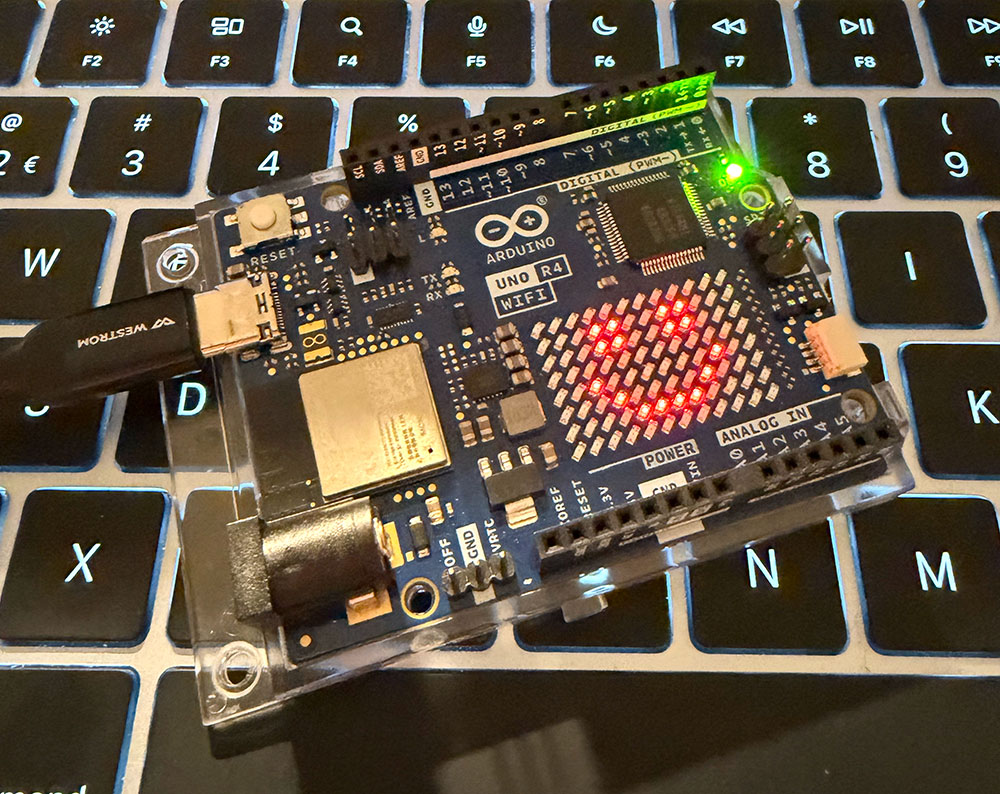
I also shipped another helper module, Arduino::LEDMatrix, which lets you use the LED matrix built into the UNO R4 board.
use Arduino;
use Arduino::LEDMatrix;

constant @SMILE = frame q:to/END/;
    ............
    ...##..##...
    ...##..##...
    ............
    ..#......#..
    ...#....#...
    ....####....
    ............
    END

LEDMatrix.begin;
LEDMatrix.show(@SMILE);
Note that this program has no loop, so the generated .ino file will contain the following stub:
void loop() {
    rk_halt(0);
}
More examples
There are more examples in the t/arduino/cases directory in the repository.
A detailed introduction to programming Arduino with Raku is also available.
Built-in support
Both modules, Arduino and Arduino::LEDMatrix, are recognised by the Raku++ engine, so you don’t even need to install them to run the code. They are also available in the Ecosystem, so the program will also run under other Raku implementations; in that case, though, you’ll only get an error message saying that --target=arduino requires Raku++.
The --exe and --slim options handle programs that don’t use any Arduino features, so the binary won’t contain any unnecessary code.