Raku Books / Creating a Compiler in Raku / Building AST
The AST blocks
We start with the smallest program to make the whole process easy. The program contains a single statement that declares a variable:
my a;This program can be presented by a single AST node. Let us call it
AST::ScalarDeclaration and give it two attributes—the name
of the variable and its value. In the given program, the initial value
is not set by the user, so we will initialise it with zero.
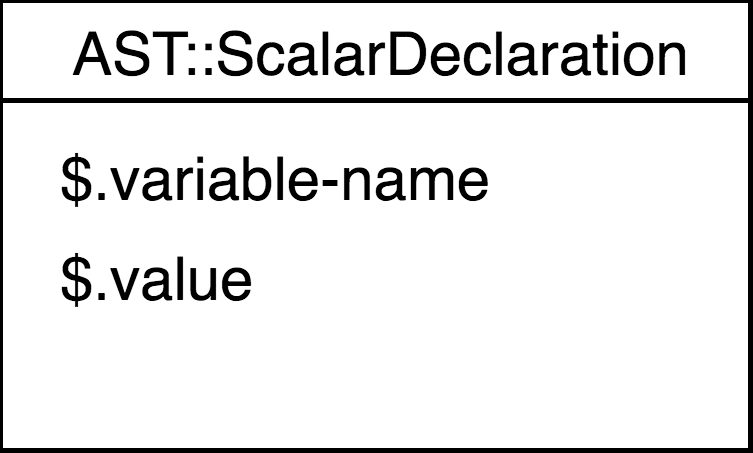
The goal has been set, so let us implement it in code. As you may guess from the image, we are going to create a Raku class. It may be helpful from the very beginning to inherit it from the common base class, which can be empty at this moment.
class ASTNode {
}

class AST::ScalarDeclaration is ASTNode {
    has Str $.variable-name;
    has $.value;
}
The AST::ScalarDeclaration node represents the whole
program, but there should be some common start node that will be the
same for every possible program. Let us create another class to
represent the TOP rule. As you remember from the previous
chapters, our TOP rule matches either multi-line comments
or statements:
rule TOP {
    [
        | <one-line-comment>
        | <statement> ';'
    ]*
}
There is no need to create AST nodes for comments. Comments are well
recognised by the parser, but they do not emit any executable code. So
we will just do not add them to the AST of the program. The top-level
AST node’s attribute is an array of possible statements, which are also
ASTNodes:
class AST::TOP is ASTNode {
    has ASTNode @.statements;
}
That is enough for our program. This is how the resulting AST looks like:
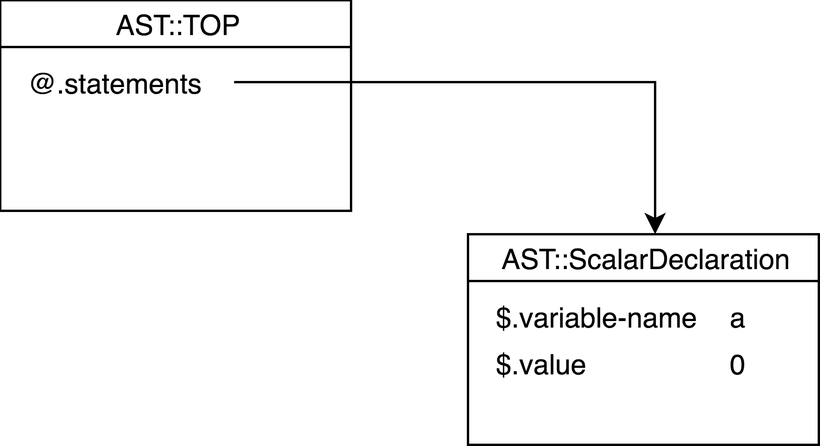
Later we can walk along the tree branches and execute the instructions. But first let us change the grammar actions so that they produce the AST nodes.
The scalar declaration action can be executed either with an assignment or without it. In our program, there is only declaration, so let us modify only one of the two multi-methods:
multi method scalar-declaration($/ where !$<value>) {
    $/.make(AST::ScalarDeclaration.new(
        variable-name => ~$<variable-name>,
        value => 0,
    ));
}
Here, we are creating the AST::ScalarDeclaration node.
The variable-name attribute takes the name of the variable,
the value attribute is set to zero.
For this, we not only have to change existing actions, but also have
to define the methods above the scalar-declaration, such as
TOP, statement and
variable-declaration.
The variable-declaration method is now just a proxy
method that passes the made value to the next level.
method variable-declaration($/ where $<scalar-declaration>) {
    $/.make($<scalar-declaration>.made);
}
There are three alternative branches in the statement
rule, but we need only one now, so, again we are simply passing the AST
node further.
method statement($/ where $<variable-declaration>) {
    $/.make($<variable-declaration>.made);
}
Finally, at the TOP level, create the AST::TOP node and
fill its @.statements with the below nodes.
method TOP($/) {
    my $top = AST::TOP.new;
    for $<statement> -> $statement {
        $top.statements.push($statement.made);
    }

    dd $top;
}
To see the structure of the generated AST tree, some debug output is added.
Assemble the program fragments together, and run the compiler against the program from the beginning of this section. Its top node will contain the following data:
AST::TOP $top = AST::TOP.new(statements => Array[ASTNode].new(AST::ScalarDeclaration.new(variable-name => "a", value => 0)))You can see an array of statements with a single statement which is a
scalar variable declaration, which is called a and is set
to 0.
Let us add another line to the program and initialise the variable:
my a;
my b = 2;
The desired AST should contain two statement nodes, where the second
one declares the variable b with initial value
2:
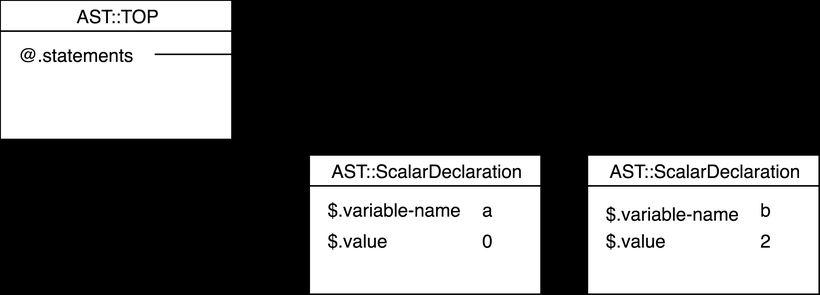
This time, it is better not to use multi-methods, as the change in
the scalar-declaration method is tiny comparing to the size
of the method itself. The check of the $<value> is
done inline:
method scalar-declaration($/) {
    $/.make(AST::ScalarDeclaration.new(
        variable-name => ~$<variable-name>,
        value => $<value> ?? $<value>.made !! 0,
    ));
}
The rest of the chapter will be dedicated to covering the existing grammar and generating AST nodes for other rules and tokens.